Crowds don’t always look at the main screen. Many times, their eyes drop to that moving strip of scores at the edge. That small detail carries a lot of weight. What sports ticker display keeps people updated without breaking the flow of the game? This blog explains what it is, how it works, and what actually matters before buying one.
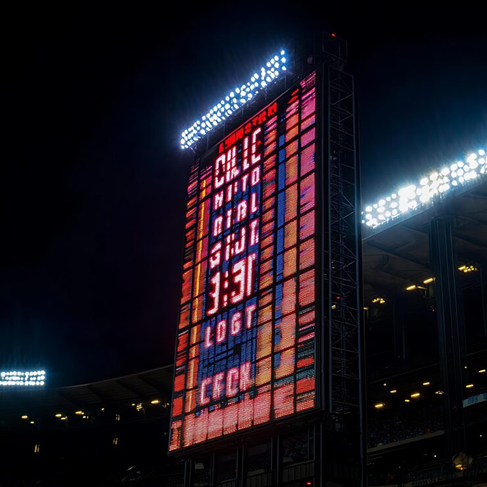
A sports ticker display is a digital screen that scrolls live scores, stats, and updates. It runs continuously, showing information in real time. Most modern systems use LED technology because it performs better in bright and busy environments.
An LED sports ticker display is designed for visibility. Whether placed in a stadium or a small gym, the text remains sharp and easy to read.
Static screens struggle to hold attention. Movement changes that. A ticker adds motion, and motion naturally pulls the eye.
Businesses use them to keep people engaged without effort. Sports bars rely on them for multiple game updates. Fitness centers use them for schedules and highlights. Even retail stores use sports content to create energy inside the space.
A good led display sports ticker quietly improves the experience without needing constant interaction.
Behind the scenes, the setup is simple but effective. Content flows from a source into the display through software.
Cloud-based systems have made things easier. Updates can be pushed from anywhere, which saves time and avoids manual errors.
A real case helps here. A mid-sized sports bar added a ticker synced with live match feeds. Customers stayed longer because they could follow multiple games at once. That small addition changed how people interacted with the space.
Many buyers focus only on price. That usually leads to problems later.
Software often gets ignored, but it matters a lot. A strong display with poor control software quickly becomes frustrating.
Older display types still exist, but they don’t offer the same flexibility. LED systems handle motion and brightness far better.
Traditional displays can show information, but they don’t feel alive. A ticker, on the other hand, keeps updating. That constant movement makes a difference in crowded environments.
Rushed decisions here usually lead to regret. Measure your space properly. A display that looks fine on paper might feel too small in reality. Think about who will manage the system. Complicated software slows things down if the team is not technical.
Support and warranty also matter. Displays run for long hours, and reliability becomes important over time.
A sports ticker display is more than a visual add-on. It works as a communication tool that keeps people informed and engaged at the same time. When used properly, it improves experience without adding extra workload.
A well-chosen, led sports ticker display brings energy into a space. It keeps information flowing and attention steady. The right choice depends on clarity, ease of use, and long-term reliability.
Focus on those basics, and the investment pays off. Solidpixels understands how digital elements like these quietly shape better user experiences.
A sports ticker display is a digital screen that scrolls live sports scores, updates, and news in real time.
An LED sports ticker display uses software and data feeds to send live content to an LED screen, which scrolls continuously.
A led display sports ticker offers better brightness, real-time updates, and more engaging visuals compared to traditional displays.
A led sports ticker display is commonly used in stadiums, sports bars, gyms, and retail spaces to keep audiences informed and engaged.
Most people don’t read long notices anymore. Attention spans are short, distractions are everywhere, and information gets missed. That’s exactly where an LED news ticker quietly does its job. A simple scrolling line can deliver updates faster than emails, posters, or even announcements.
This blog breaks down the most practical use cases, with real insights on how businesses, events, and public spaces are using them right now.
Digital communication has shifted. Static content just sits there. Moving text pulls the eye, even when people are not trying to read it.
Industry studies show that dynamic displays improve recall and engagement significantly. It’s not about fancy tech. It’s about visibility and timing.
Many businesses now prefer tickers because they are easy to update, low maintenance, and highly noticeable in busy environments.
Office communication often gets buried in emails or chat tools. Important updates slip through the cracks. LED news tickers solve this by placing information directly in shared spaces where people naturally look.
A startup team in Prague replaced internal newsletters with a lobby ticker. Within weeks, employees reported better awareness of company updates. No extra meetings needed.
Events are unpredictable. Schedules shift. Speakers run late. Printed materials quickly become outdated.
LED tickers bring flexibility and control. Updates can be pushed instantly without confusion.
An event organizer once shared that adding ticker displays reduced attendee confusion by nearly half. People simply followed the scrolling updates instead of asking the staff.
Retail environments depend on quick decisions. Shoppers don’t stop to read long descriptions. A moving message creates urgency. It catches attention at just the right moment. Stores use LED tickers for flash sales, limited offers, and product highlights. Even small updates like “Only 3 items left” can influence buying behavior. Experience shows that motion increases curiosity. Curiosity often leads to action.
Public areas like airports, hospitals, and stations deal with large crowds and constant updates. Clarity becomes critical. LED news tickers work well here because they are visible from a distance and easy to scan. Information flows continuously without overwhelming people.
Transport hubs, for example, rely on ticker systems to display delays, platform changes, and alerts. This reduces confusion and improves crowd movement.
Effectiveness depends on how the ticker is used, not just where it is placed. Keep messages short. Avoid long sentences. Update content regularly so it stays relevant. Placement matters too. Eye-level or slightly above works best in high-traffic zones. People should notice it without effort. Overloading the ticker with too much information can reduce its impact. Simple always wins.
LED news ticker displays are simple, but they solve real communication problems. They bring speed, clarity and visibility across offices, events, retail stores and public spaces.
Businesses that want modern, effective communication often combine smart display tools with strong digital platforms. That’s where solutions like Solidpixels come into play, helping brands present information clearly both online and offline.
A led news ticker is used to display scrolling messages for announcements, updates, and promotions in real time.
Yes, they improve visibility of important updates without relying only on emails or meetings.
They can help by highlighting offers and creating urgency, which often leads to faster buying decisions.
High-traffic areas like entrances, lobbies, and waiting zones provide the best visibility and impact.
In today’s fast-paced world, staying informed and organized is more important than ever. Whether you’re managing your workday, following your favorite sports team, keeping up with the stock market, or just trying to stay on top of the weather, having information delivered in a clear, convenient way can make all the difference. Enter smart displays—compact, stylish devices that provide real-time updates for the things that matter most to you.
One such device making waves is the Solidpixels Tetra—a minimalist LED smart display that’s changing how people interact with everyday information. Unlike traditional screens filled with distractions, Tetra is focused, elegant, and endlessly customizable. Here’s how a smart display like the Tetra can enhance your daily routine.
We live in a world of information overload. From notifications on our phones to constant app switching, it’s easy to get overwhelmed. Smart displays simplify the experience by delivering key updates without the clutter. With Tetra, you can:
It brings what matters most to your eyes—without pulling your attention away from your work or daily life.
Productivity tools are everywhere, but sometimes you just need a simple nudge to stay on track. Tetra offers several apps that make managing time and tasks more visual and effective:
When you see your goals and reminders in real-time, they become harder to ignore—and easier to achieve.
Your home or office should feel like you, and Tetra supports that through its wide range of customization options:
The ability to make your Tetra reflect your style and interests transforms it from a device into a part of your identity.
If you’re a business owner, entrepreneur, or content creator, Tetra can be your real-time hype machine:
There’s something powerful about watching your growth unfold live. It’s motivational, visual, and a constant reminder of how far you’ve come.
Not everyone wants a giant screen dominating their space. Tetra comes in three sizes to fit your lifestyle, whether you’re looking for something subtle for your bedside table or a larger display for your office or retail counter.
With its pixel-art aesthetic, Tetra blends vintage charm with modern utility—perfect for anyone who appreciates design as much as function.
Go on gratitude walks with your child. As you walk, take turns naming things you are grateful for in your surroundings. This could be the beauty of nature, the warmth of the sun, or the company of each other. Gratitude walks help children appreciate the world around them.
A smart display like Solidpixels Tetra is more than just a gadget—it’s a tool for living a more intentional, informed, and expressive life. By giving you quick access to the information you care about, helping you stay organized, and adding a layer of personality to your space, Tetra becomes a natural part of your daily rhythm.
It’s time to upgrade from cluttered screens and scattered apps. With Tetra, everything you need is displayed simply, beautifully, and right when you need it.
Ready to simplify your life—one pixel at a time?
Solidpixels Tetra is more than just a screen; it’s a canvas for expression, a productivity tool, and a live connection to the world around you. Whether you’re a tech enthusiast, a business owner, or someone who just appreciates a smart and stylish desk setup, Tetra has something for you.
Here are 10 creative and inspiring ways to use your Solidpixels Tetra that go beyond the basics; and show off just how versatile this little display can be.
Start your day with intention by showing a positive affirmation, daily quote, or personal mantra on your Tetra. Use the Free Text app to display short phrases like:
Change it daily or weekly to keep your mindset fresh and grounded.
If you’re growing your brand on TikTok, Instagram, or YouTube, seeing your follower count in real time is a major motivator. With Tetra, you can track your growth, celebrate milestones, and even feature it in your content or livestreams.
Perfect for influencers, creators, and small businesses building a presence online.
Stay in the zone with the Pomodoro app, which breaks your work into 25-minute focus sessions followed by short breaks. It’s a powerful way to structure your day and stay consistent—especially when your schedule is packed.
Let Tetra silently guide your rhythm with timers that keep you on track without interrupting your flow.
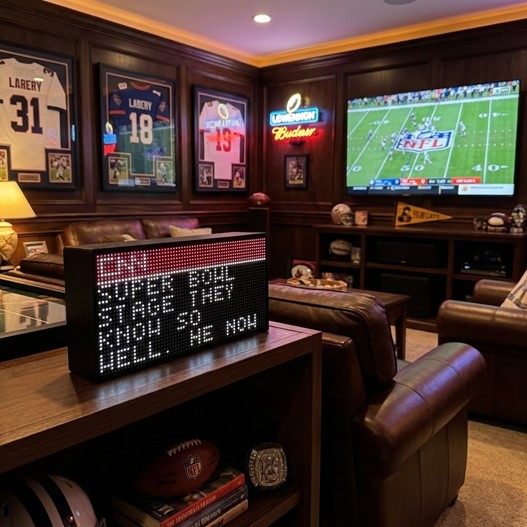
Never miss a score again. Use the Sports or Team Game app to follow your favorite football, basketball, or baseball team. Whether you’re working, relaxing, or hosting friends, Tetra keeps you updated every 90 seconds with live scores.
It’s a must-have for sports fans who want to stay connected without staring at their phone.
Running a small business? Use Tetra to show your daily sales, number of orders, or total profit. This is perfect for team motivation, customer transparency, or just keeping your goals front and center.
Combine it with seasonal promotions or customer milestones for even more impact.
Bring your space to life with animated pixel art. Whether it’s Pacman, Pikachu, or Jake the Dog, these looping animations add a layer of personality and playfulness to your desk, shelf, or retail counter.
You can switch between different animations to match your mood, the season, or just to surprise guests.
If you trade or invest, Tetra makes it easy to stay updated on key prices. Use the Crypto or Stocks apps to track your favorite tickers and top movers—updated every 90 seconds.
It’s a clean, ambient way to monitor the markets while keeping your workspace focused and distraction-free.
Use the Trip Countdown or Custom Countdown app to track how many days are left until your next vacation, event, or product launch. It builds anticipation and helps you stay motivated for the things you’re excited about.
Great for travelers, creatives, or teams working toward a big launch date.
Tetra’s Current Weather and 3-Day Forecast apps display temperature and conditions in real time. This is great for planning your day—but it also adds a subtle atmospheric touch to your space.
It’s like a window to the outside world, right from your wall or desk.
Celebrate your heritage, represent your country, or just add some color with the Flags app. Or use the Custom Image app to display a meaningful photo or brand asset.
This turns Tetra into a personal, expressive feature—whether in a home office, creative studio, or retail space.
The beauty of Solidpixels Tetra lies in how flexible it is. It’s not just a smart display—it’s a reflection of what matters to you, in real time. Whether you’re using it to stay productive, connected, inspired, or just to show off your personality, there are endless ways to make it your own.
So get creative. Set it up your way. And let your space do the talking.

